
A real phone for your AI agent
Coding agents build pages they never see on a phone. Mirrorly's MCP server gives them one: Claude Code, Cursor and other agents open your page on an iPhone or Android, scroll, take screenshots and read them, then fix what looks wrong and check again.
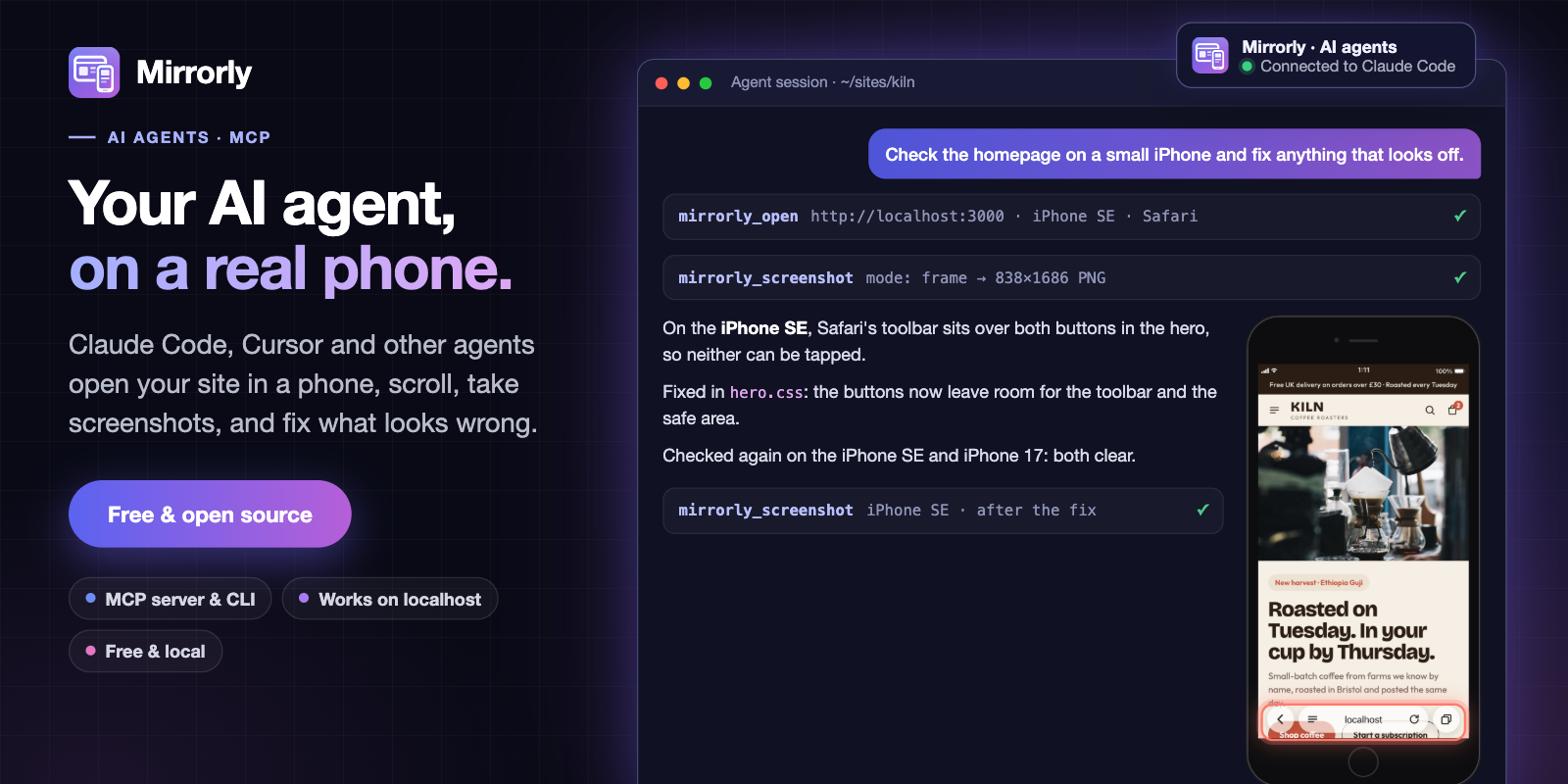
An agent checks a local dev server on an iPhone SE, finds the buttons under Safari's toolbar, and fixes them.
Why it helps
- Agents see what they built. A screenshot from a real phone size, with Safari's or Chrome's bars, shows overflow, cramped text, tiny tap targets and content hidden under the toolbar, which reading the code doesn't.
- The loop closes on its own. Look, fix, reload, look again, without you resizing windows or reaching for your phone after every change.
- Several devices in one go. An iPhone SE and a Pixel, light and dark, portrait and landscape, from the same devices as the sidebar.
- Your dev server and your logins.
localhostworks. With the switch on in Firefox, pages you're signed in to work too. - Local and free. No account, nothing uploaded; the screenshots stay on your computer.
Set up
It needs Node.js 18 or later. Run one command in a terminal:
npx -y github:dazecoop/mirrorly installIt adds Mirrorly's MCP server to every agent app it finds (Claude Code, Claude Desktop and Cursor), installs a Mirrorly skill for Claude Code so it knows when to use it, then starts the server the way each app will and checks it answers with its tools. Config files are backed up first. Restart the apps afterwards; fully quit Claude Desktop.
| To | Run |
|---|---|
| Add it to one app | npx -y github:dazecoop/mirrorly install claude-code (or claude-desktop, cursor) |
| Add it to a VS Code project | npx -y github:dazecoop/mirrorly install vscode, in the project's folder |
| See which apps have it | npx -y github:dazecoop/mirrorly status |
| Remove it (and the skill) | npx -y github:dazecoop/mirrorly uninstall |
Use your own Firefox
In Mirrorly's settings (click the line at the top of the sidebar), find AI agents and open its page. Turn on Let AI agents use Mirrorly. The agent's phones then open in your Firefox, each in a background tab, so your sidebar and tabs are left alone and pages you're signed in to work. The page shows whether an agent is connected, and has the setup steps, a test prompt and example prompts.
With the switch off, agents can still use Mirrorly: it starts a separate headless Firefox for them, without your logins.
Test it
In a new agent session, paste:
Find the Mirrorly MCP server's mirrorly_status tool. Its name may have a prefix, like mcp__mirrorly__mirrorly_status, and if your tools load on demand, search your tools for "mirrorly" first. Call it and reply with exactly what it returns. Only if no Mirrorly tool exists after searching, reply with: MIRRORLY NOT INSTALLEDA reply starting Mirrorly MCP is working means it's set up. It goes on to say whether pages open in your Firefox or in headless Firefox.
Ask your agent
Use Mirrorly to open http://localhost:3000 on an iPhone SE, take a full-page screenshot, and tell me anything that looks broken or awkward on mobile.Use Mirrorly to open http://localhost:3000 on an iPhone 17 and on a Pixel 10. Compare full-page screenshots of each, and fix what looks wrong on either.Use Mirrorly to check the checkout page in dark mode on an iPhone, then fix anything hard to read and check again.The tools
| Tool | What it does |
|---|---|
mirrorly_open | Loads a URL in a phone: device, browser (safari, chrome, firefox, none), appearance (light or dark), landscape. Again to reload after a change. |
mirrorly_scroll | One of position (top or bottom), y, by, or selector (CSS). |
mirrorly_screenshot | mode: frame (the phone with its bars), screen (just the page in view) or full (the whole page). Returned to the agent as an image, and saved as a PNG whose path is in the reply. |
mirrorly_devices | The devices on offer, and the browsers each can be drawn in. |
mirrorly_status | Whether pages open in your Firefox or headless, and what's open. |
From a terminal
The same phone for scripts, CI, or agents without MCP. Each command prints the PNG's path.
npx -y github:dazecoop/mirrorly screenshot http://localhost:3000 --device iphone-se --mode full --out mobile.png
npx -y github:dazecoop/mirrorly screenshot https://example.com --device pixel --browser chrome --appearance dark
npx -y github:dazecoop/mirrorly devices
How it works, and privacy
The MCP server is a small Node program your agent app starts. With the switch on, the
extension connects to it at ws://127.0.0.1:47616, on your own computer, and
only while an agent app is running it. It accepts only the extension and local programs,
so websites can't talk to it. Each agent session gets a phone in a background tab, which
closes after 10 idle minutes; the switch, and a button on the AI agents page, close them
straight away.
Without the switch, the server starts a headless Firefox with Mirrorly in it, for that session only. Nothing is sent anywhere but the pages the agent asks to open, and the screenshots stay on your computer. See the privacy policy.
Troubleshooting
- "MIRRORLY NOT INSTALLED": run
npx -y github:dazecoop/mirrorly status. It lists each app, whether Mirrorly is installed there, and whether it starts. Then fully restart the app. - The AI agents page says "waiting for an agent": that's normal when no agent app is running Mirrorly. It connects within a few seconds of one starting.
- Pages open headless though the switch is on: check the port under
Options on the AI agents page matches
MIRRORLY_PORTin your agent's config, if you set one. - Headless Firefox won't start: install Firefox, or set
MIRRORLY_FIREFOXto its binary.