
Scorly for AI agents
Scorly runs as an MCP server and a command-line tool as well as a browser extension. Your coding agent can audit a page, fix what Scorly finds in your code, then re-audit and tell you how the score moved, using the same checks and scores as the extension. Everything runs on your own computer.
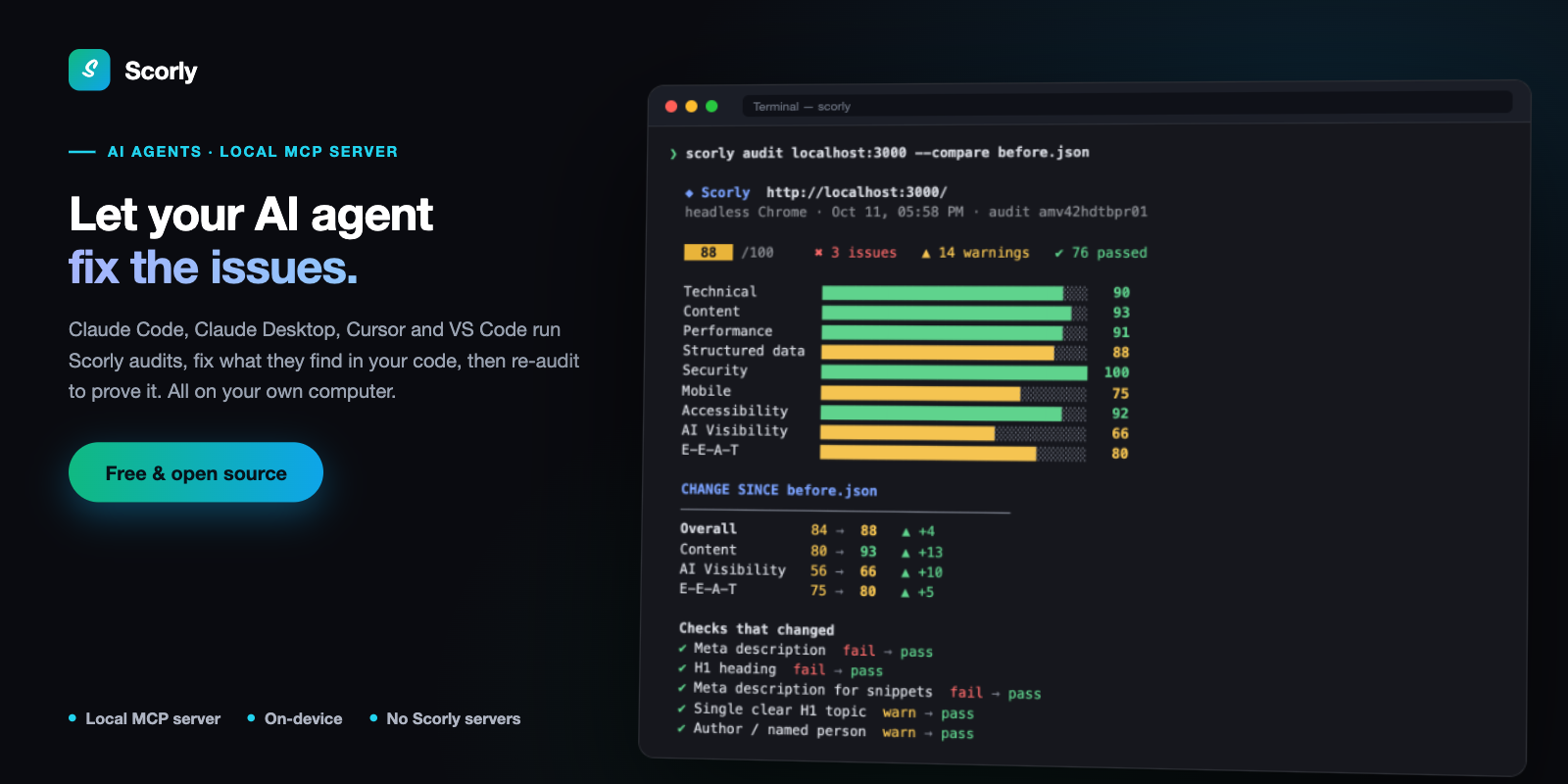
An agent's re-audit after fixing a page: what moved, and which checks now pass.
- Claude Code
- Claude Desktop
- Cursor
- VS Code (Copilot)
- Terminal & CI
Set up in one command
You need Node.js 18 or newer. In a terminal, run:
npx -y github:dazecoop/scorly installThis adds Scorly to every agent app it finds on your computer (Claude Code, Claude Desktop and Cursor, whichever you have), then starts Scorly once, the way those apps will, to prove it works:
Installing Scorly in every agent app found on this computer:
✔ Claude Code: added (~/.claude.json)
✔ Claude Desktop: added (…/Claude/claude_desktop_config.json)
· Cursor: not found on this computer, skipped

  Checking it starts…
✔ Verified: the Scorly MCP server starts and offers scorly_audit, scorly_compare, scorly_status.
Then restart the apps it lists: start a new Claude Code session (in VS Code, reload the window), or fully quit and reopen Claude Desktop or Cursor. A new chat isn't enough, because apps only load MCP servers when they start.
PATH, so a plain npx in their config fails for anyone
whose Node came from nvm, Volta or Homebrew. install writes
absolute paths instead and keeps a .scorly-backup of each config
it changes.
| Command | What it does |
|---|---|
install | Every agent app found on this computer. |
install claude | Claude Code and Claude Desktop. |
install claude-codeinstall claude-desktopinstall cursor | One app. |
install vscode | The project you run it in (.vscode/mcp.json), for Copilot agent mode. |
uninstall | Removes Scorly from every app, then re-reads each config to confirm it's gone. Takes the same app names. |
status | Lists each app, whether Scorly is installed there and whether it starts, and whether the extension is connected. |
Installed a new agent app later? Run install again.
Check it works
Start a new session in your agent and paste:
Find the Scorly MCP server's scorly_status tool. Its name may have a prefix, like mcp__scorly__scorly_status, and if your tools load on demand, search your tools for "scorly" first. Call it and reply with exactly what it returns. Only if no Scorly tool exists after searching, reply with: SCORLY NOT INSTALLED- "Scorly MCP is working … Audits run in the user's browser": all set.
- "Scorly MCP is working … The Scorly extension is not connected": it works, and audits run in a headless Chrome. To use your own browser, see Run audits in your own browser.
- "SCORLY NOT INSTALLED": this app didn't load Scorly. Check that the
install listed it with ✔ and ended with ✔ Verified, then fully quit and
reopen it.
npx -y github:dazecoop/scorly statusshows which apps have it.
The test prompt names the tool and tells the agent to search for it. Agents with many tools load them on demand, and MCP tool names usually carry a prefix, so a vaguer prompt ("use Scorly") can make an agent conclude Scorly isn't there, or reach for a browser instead.
Ask your agent
The extension's AI agents page (the robot icon in the popup) builds these prompts for you from the page you were looking at. To audit and fix:
Use the Scorly MCP tools (scorly_audit, scorly_compare; names may have a prefix like mcp__scorly__, and if your tools load on demand, search your tools for "scorly" first). Audit http://localhost:3000. Fix the issues you can in the codebase at /Users/you/Sites/my-site, most severe first. Then re-audit it and tell me how the score changed and what you fixed. If no Scorly tool exists after searching, stop and tell me instead of using a browser.- Audit only: turn off Fix the issues in my code and the prompt asks for the scores and the most important issues with how to fix each, with no files changed.
- Compare with another page: fill in Compare with (usually your live site) and the agent audits both and reports what differs.
- Project folder: optional when the agent already has your project open. In
Claude Desktop, attach the folder to the chat with + → Add folder. The folder
picker can only fill in the folder's name, because browsers don't reveal full paths.
For the full path, select the folder in Finder and press
⌥⌘C(on Windows: Shift + right-click → Copy as path).
What the agent gets
| Tool | Returns |
|---|---|
scorly_audit | The overall and category scores, then every failing check and
warning with its severity and reason, most severe first. detail: "full" returns the
complete report and "json" the raw export. Re-auditing a URL already audited in the session
adds a Change since previous audit section. |
scorly_compare | A field-by-field diff of two audits from the session (before and after fixes, or localhost against live), using the same engine as the extension's Compare view. |
scorly_status | Whether audits run in your browser or in headless Chrome, and this session's audits. |
Some checks depend on hosting rather than code (HTTP/2, security headers, HSTS), so they can't pass on a local dev server. Agents are told to say so rather than work around them.
Run audits in your own browser
By default, audits run in a separate headless Chrome. Turn on Let AI agents use Scorly on the extension's AI agents page and they run in your own browser instead:
- Your logins: pages you're signed in to can be audited.
- No extra Chrome: nothing else to install, and it works for Firefox users.
- What you'll see: each audit opens the page in a background tab, runs the same analysis as the popup, and closes the tab.
How the connection works
- When an agent audits a page, Scorly's agent tool opens a bridge on
ws://127.0.0.1:47615, on your own computer. - The extension checks for it every 30 seconds while the switch is on, and connects. The first audit after a quiet spell can wait up to 30 seconds for that.
- The bridge closes itself after 10 minutes without audits. Several agent sessions share one bridge.
- While it's open, the popup shows a strip with a Stop button that closes it at once. The agent's next audit opens it again. Turn the switch off to keep agents out of your browser altogether; audits then fall back to headless Chrome.
The robot icon in the popup shows the state: no dot when the switch is off, grey while it's on but idle, blue while an agent is connected.
Options (on the AI agents page): Only allow localhost URLs limits
in-browser audits to dev servers, and anything else runs headless, without your
logins. Bridge port changes 47615 if it's taken; the setup command
shown on the page then includes the matching SCORLY_PORT.
Use the CLI
For scripts, CI, or agents without MCP support. Nothing to install first:
# Audit and keep the result
npx -y github:dazecoop/scorly audit http://localhost:3000 --save before.json

# …make changes, then see what moved
npx -y github:dazecoop/scorly audit http://localhost:3000 --compare before.json

# Two pages, field by field
npx -y github:dazecoop/scorly audit https://example.com --save live.json
npx -y github:dazecoop/scorly audit http://localhost:3000 --save local.json
npx -y github:dazecoop/scorly compare live.json local.json
In a terminal the report is colour-coded:
  ◆ Scorly  http://localhost:3000/
  headless Chrome · 11 Oct, 16:31 · audit amv41nvox6oit

   97  /100     ✖ 0 issues   ▲ 6 warnings   ✔ 103 passed

  Technical        ████████████████████████████████  100
  Performance      ███████████████████████████████░   98
  Accessibility    ██████████████████████████████░░   93
  AI Visibility    ███████████████████████████░░░░░   85

  WARNINGS · 6
  ──────────────────────────────────────────────
   MED   Colour contrast  Accessibility
         3 of 64 sampled text elements below WCAG AA contrast.
Piped or redirected output is plain Markdown, so scripts and agents get something they can parse.
| Option | Effect |
|---|---|
--detail full | The complete report: every section, link and image. |
--detail json | The raw export payload, for scripts. |
--via browser--via headless | Require your browser (the extension switch must be on), or never use it. The default uses your browser when connected. |
--save file.json--compare file.json | Keep an audit, or show what changed since a kept one. |
--markdown | Plain Markdown even in a terminal. NO_COLOR=1 does the same. |
SCORLY_PORT | Bridge port, if you changed it in the extension. |
SCORLY_CHROME | A Chrome or Chromium binary for headless audits. |
Privacy
Scorly's agent tool runs on your computer, and the bridge to the extension
never leaves it (127.0.0.1 only, and web pages can't connect to it). No
Scorly-owned or third-party server is involved. What your agent does with an
audit, including sending it to its AI provider, is up to the agent you use. The
privacy policy covers exactly what is stored and when.
Troubleshooting
The agent says Scorly isn't installed
Run npx -y github:dazecoop/scorly status. If the app shows ✘, run
install again and read the reason it prints. If it shows ✔, fully quit
and reopen the app, and use the test prompt above, which tells the agent to
search for the tool.
Audits run headless even though the switch is on
Check that the extension's port matches SCORLY_PORT in your agent
config (the default needs neither), and that Only allow localhost URLs
isn't blocking the URL. The first audit after a quiet spell waits up to 30
seconds for the extension to connect.
Headless Chrome won't start
Install Google Chrome, or set SCORLY_CHROME to a Chrome or Chromium
binary. Or turn on the extension switch so audits use your browser.
Performance numbers differ from the popup
A page loaded in a background tab is never painted, so it records no LCP or CLS. Scorly marks those audits and leaves paint timings out of before/after comparisons rather than reporting a change that isn't real.